Saturday, 4 August 2018

Another year - 8 years in internet broadcasting

Happy Birthday To Us

Well would you believe it, another year and we are still here doing our thing. We started the station way back in August 2010 using a PC as the broadcast server, boy have things moved on in the last 8 years. Much more competition now from other styles of music services has made it a hard slog to keep listeners.

We have noticed an increase in listener traffic again this year as we think listeners like the "surprise" of presented music, especially as an alternative to the established "terrestrial" stations who are financially driven to a limited and very repetitive playlist.  

We think we provide a wide and varied selection of programmes that should suit listeners within the 35- to what ever age range. Listeners are surprised by some of the little heard tracks we and our presenters play . We are continuing this formula and adjusting the content to still engage with some of our "younger" listeners too.

If you would like to find out more about us and maybe join us for the next 8 years, then drop by and see us at Affinity Radio or maybe listen to us direct at Affinity pop up radio player

Sunday, 12 November 2017

What Is The Best Microphone for Internet Radio

Questions?

We get asked  by folks starting out in internet radio about what is the best microphone to use on an internet radio station.

To be honest, our answer is get the best you can afford! That simple.


Top of the range

There are a number of exceptional microphones available including the iconic Electrovoice RE20 (£420) and the Neumann BCM 705 (£497)  which is a lot of cash!.

The real world

What do we use on Affinity Radio you may ask.  Well our main studio microphone in both of our studios is a Behringer B-1 Single Diaphragm Condenser Microphone which is currently retailing at a very reasonable £80. 

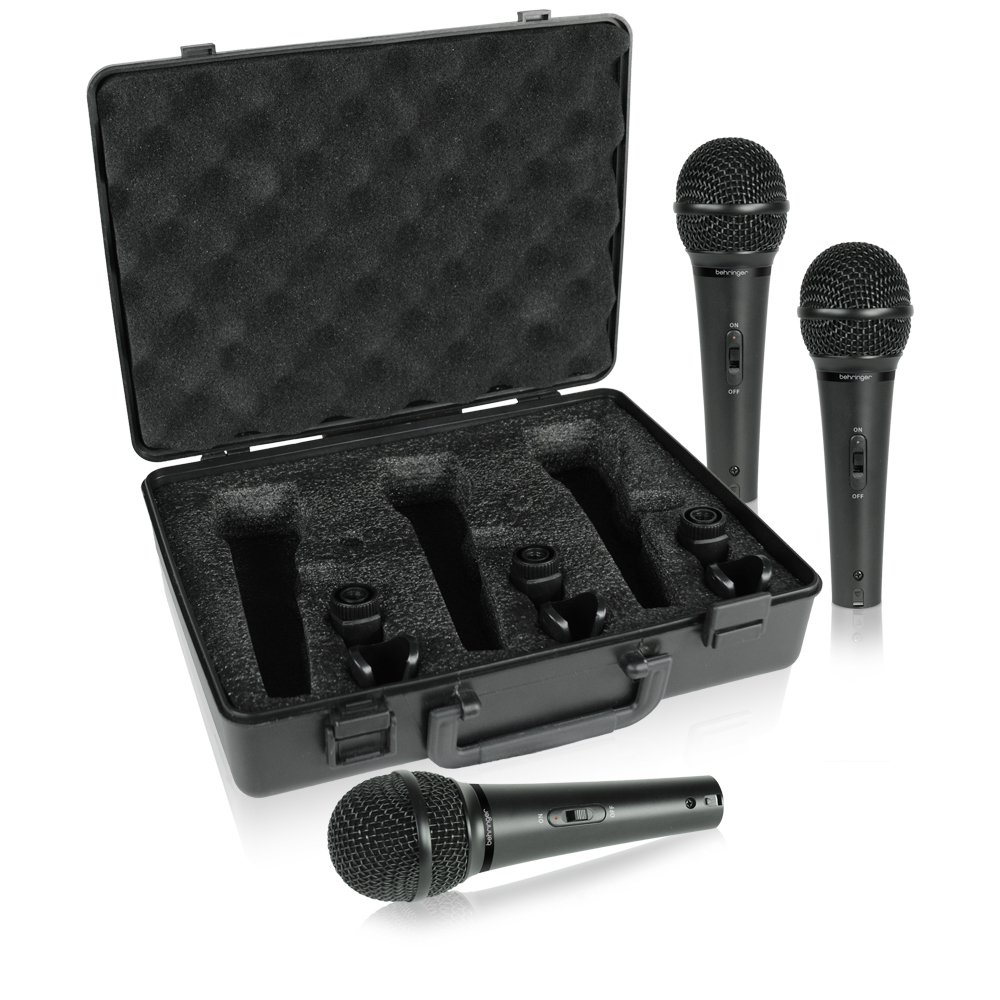
We also use as guest / outside broadcast microphones a brace of Behringer XM1800S Ultravoice dynamic microphones now at a bargain price of £35 for a set of 3. We also use a Shure SM58 (£95) and to be honest you would be hard pressed to tell the difference between the Shure and the XM1899S.

Ultimately the choice is yours and the size of your budget. Always make sure you use a shock mount and pop guard to as this stops a lot of the noise transmitted from your broadcast desk and your slobbering presenter.

Feedback please.

Well I hope this has been of use, please let me know via studio@affinityradio.net.

Also drop by our website at http://www.affinityradio.net and our Face book and Twitter accounts and give us a Like if you are feeling generous. 

Thanks,

Dave Kelly
Presenter and Technical Manager
Affinity Radio

Monday, 17 April 2017

Listener Feedback

Don't Hold Your Breath

So you have just started your very own internet radio station and the listeners are (maybe) flooding in. You have a chat bar on the station web page, you also give out your contact email address during programs and jingles.

Silence?.....well sometimes it happens. Not all listeners want to get involved in your station, they may love the music you play but that's as far as it goes with most. From my last 7 years experience it can be depressing, but don't take my word for it.

Niche is good

One way to attract feedback is through specialist (niche) programs that have a distinct following. Listeners seam to be more passionate about their particular type of music, a good example is  Northern Soul. 

Social Media 

Facebook 

Got a page? get lots of followers, tell them about your shows, station details and how to get in touch. Keep the content fresh and updated. look for people with interests that align with your station or show content, invite them to your page. Also make a "contact us" button to your page to make it easy for people to get in touch. In reality, it is a must, but can be time consuming for little or no increase in actual listeners. Here is a link to our station  Affinity Radio Facebook Page


Twitter

Using a similar strategy as Facebook, also set up automated twitter feeds of what track you are playing on your station. Get those followers and you will get lot's of likes, again time consuming and generally from an internet radio station viewpoint, a necessity but again 4,000 plus followers does not equate to listeners! Check out our Affinity twitter page


Blogging

So did you find Blog this interesting? Are you going to comment? Has anybody commented? ...............what do you think?

 YouTube

Now this one is something I have dabbled in but must admit to not having much success in generating much interest. It is an area that I will be investigating in more detail soon so will let you know how I get on soon. Here is one video we produced on the missing "radio" button on iTunes

 Website

You need one, this is your shop front and communication hub. It's also a guide to how many interested people are out there by looking at "hits" on your site. Today it's quite easy to set up a website and can be free, check out Wix for a good example. We use a paid for software option from Serif. Check out our website here 


Internet Presence

And finally.... all the above will build your stations presence on the internet. Search for your station name to see how many times it pops up in your favourite search engine. All of the discussed topics will increase your chances of being found on the web. Your website enables people to contact you, but beware, most contacts will be spammers, Russian Brides, etc... so be warned.

References

Well I hope this little rant (blog) has helped some of you. 

Here are a few links to other resources you may find useful.
Top-10-internet-marketing-strategies
how-to-gain-more-listeners-for-your-internet-radio-station
radio.co - blog
5-directories you should list your station with

Cheers for now
Dave
Affinity Radio 

Thursday, 13 April 2017

Things to consider if producing an internet radio show

How we do it

Running an internet radio station is great fun but also for small operators like us at Affinity Radio it can be very time consuming. Live shows from the studio are bounced up to our Cloud server then out to the world, this enables the Cloud to fill in any gaps if the LIVE broadcast drops out, so you should never hear dead air. Prerecorded shows are usually sent to us via Drop box, we-transfer or other file sharing system. We then have to remove all dates, editions etc so that the file title is set to a predefined format (defined by us). We then drop these (mp3) files into our presenters folders then the clever stuff happens.

Automatically add meta data

Data from each show gets transmitted with the music and is displayed on our on line player so we need to make this sensible for the listener, this is often not done by show presenters. 

We used to do this manually which as you can imagine took ages.

We use SAM Broadcaster Pro as our broadcasting software since 2010. We have found that this software can also re write the files with the appropriate data in seconds so that the listener will be able to see the artist name, the show title, presenters picture or Affinity Tile. There is additionally space for website links and much more.

Upload to the Affinity Cloud

Once the metadata is correct we upload the completed mp3 to the Cloud server. The server analyses the file and normalizes the volume so that it is in keeping with the other output on the system so sound levels are at a constant output volume. This is great however if the presenters voice level is low, the system can't compensate for this.

Scheduling

Each show has its own slot (or slots) on the server so times are set automatically when the show is uploaded. 

Things To Consider

So, you have made your show, recorded it onto mp3 and sent it out, fantastic. Making the program for free is amazing, stations like ours are self funding so we can't pay as it costs us a small fortune to keep on the air. Here are a few things to consider when doing your shows.

  • keep file naming consistent
  • make sure the microphone level brings the voice volume slightly above the maximum music level
  • remember to keep the file size to the station maximum output "quality", in our case 128 kbps as it keeps files small and some cloud systems have upload "caps" that prohibit files above certain levels so, again the poor old station manager has to convert these down to an acceptable size.

Contact Us

If you found the information useful, would like to get a show on air, or would like to know more, please email me at studio@affinityradio.net and put "Blog" in the title and I'll get back to you.

Cheers
Dave Kelly
Presenter and Technical Manager
Affinity Radio


Listen to affinity here:


Thursday, 4 August 2016

HAPPY BIRTHDAY AFFINITY


Well it's been an age since we last talked. I was just thinking it was time to get writing again,

What's been happening!

Lots of things have changed Affinity Radio in the past year. We have seen a few presenters leave, come back and leave again....don't ask!!! We have a number of new laddies and gents on board now bringing the broadcasting crew up to 27 today. We have moved servers to Radio.co in March 2016, with the old server finally turning off in June.

Its that time again

So its fast approaching 14 August 2016 when it will be our 6th year of broadcasting 24/7

A BIG thank you to all!

I'd like to thank our listeners for sticking with us and also a BIG thank you to all our presenters, sponsors and behind the scenes folks who help to make it happen.

Thanks and here is to the next 6 years.

Best regards
Dave Kelly
Presenter and co-founder of Affinity


Thursday, 23 July 2015

Staring an internet radio station?

It's been a while, but we have been busy at Affinity radio.

Keeping listeners happy is a full time occupation.

We have had a number of messages and emails asking what equipment we use and how to set up an internet radio station.

The best advice is to scour the internet, including YouTube for ideas, that's what we did way back in August 2010.

We have also included a few links that you may find useful


Here is Studio 1

Studio basics:
1 PC/Mac/Laptop
2 Streaming software (free or purchased) we started with Winamp
3 Microphone (best you can afford)
4 Mixer or Audio interface (laptop) for basic mixing of external inputs (CD player, decks, microphones etc)
5 Good internet connection
6 Obvious - Music
7 Local licences (PPL & PRS in UK)
8 Get a server provider to stream your output through
9 Register your station stream on internet radio directories
10 Get that show on the road
11 Register on iTunes, TuneIn, 
12 tell the world you exist via social media


Best of luck to you.

If you need any advice drop us an email to affinityradio.net@gmail.com and we will be glad to help.

Cheers

Affinity Radio

Monday, 3 March 2014

No "Radio" button on latest iTunes???

So you've downloaded the latest iTunes update to your PC. I'm sure there are lots of improvements, but wait a minute! Where has the "Radio" button gone?.

Someone in their wisdom has changed the name of the RADIO button to INTERNET and also has not made it a preset default setting either. So how can I listen again to my favourite internet radio station through iTunes?

All is not lost, check out the video below to get it back.

I've lost my iTunes Internet Radio Button

If you don't like to open links to You Tube, here are written instructions.


  1. Open iTunes
  2. Click on the box at Top Left of the iTunes screen
  3. Select "Preferences" from the menu
  4. in "General Preferences"
  5. Select "Internet Radio" tick box
  6. Click OK
  7. You now have a button called "Internet", this is the old "Radio" button
  8. Click on this and you'll find all the usual internet radio stations
You can find Affinity Radio under "Golden Oldies" check us out, we play the best from the 60s, 70s and 80s and a little bit more too.


Anecdote To Radio Burnout

Why Affinity Radio is Keeping it Commercial-Free? ​We’ve all been there. You’re driving down the road, or deep in the zone at your desk, ...